 Esoterik
 Handgemachte Tarotkarten
 Tarotkarten und Orakel
 Tarot Taschen & Koffer
 Glücksspielzubehör
 Diaries and journals
 Futharks Runen, I-Ching
 Kerzen & organische Farbstoffe
 Spirituelle Ouija-Bretter
 Rituelle Tische und Tücher
 Schatullen, Tuben, Gefäße
 Puppen, Amulette, Talismane
 Handgemachte Kunst
 Unique handmade collection
 Geschenke
 Postkarten, Kalender, Lesezeichen
 Gift certificate scrolls
 Leather tubes
 Esoteric coffee mugs
 Rare banknotes & stamps
 Preisrabatte
 Persönlicher Bereich
 Mein Konto
 How to place an order?
 Following my order
 Cancel my order
 Payment methods
 Delivery services
 Wholesales options
 Frequent questions(FAQ)
 Guarantees & Quality
 Impressum
 Contact information
 Website Condition of Use
 Privacy Policy Statement
 Copyright Information
Esoterik

Handgemachte Kunst
Geschenke
Persönlicher Bereich


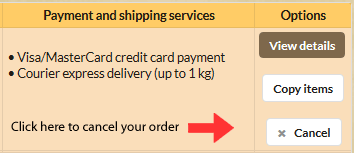 |
If you decide to cancel the order that hasn't shipped please use your order history, available in your personal section. Each order has a column named "Options" where displayed possible options for each order. Note: Orders that have shipped cannot be modified and the "Cancel" option will not appear. After submitting the cancellation request, you will see an additional screen to confirm cancellation. |

